Businesses today run on two essential engines: customer relationship management (CRM) and email marketing automation. While Dynamics 365 CRM organizes, segments, and nurtures your customer data, Mailchimp powers impactful email campaigns.
But when these two platforms run separately, teams lose time, data gets duplicated, and insights become fragmented.
Integrating Dynamics 365 CRM with Mailchimp solves this completely.
This guide is designed for marketers, CRM admins, sales teams, and technical users who want a single, authoritative resource containing:
- Easy configuration steps
- Must have features for Mailchimp & Dynamics 365 CRM integration
Whether you’re in the US, UK, Australia, Europe, APAC, or any regional market, this guide is structured to rank well across traditional and AI search ecosystems.
Let’s dive in.
Q1. What does Mailchimp + Dynamics 365 CRM integration actually do?
This integration creates a two-way connection between CRM and Mailchimp so that:
- Contacts & leads flow from CRM → Mailchimp audiences
- Campaign results flow back from Mailchimp → CRM
- Data stays synced without manual exports or spreadsheets
It becomes the backbone for connected marketing and sales operations.
Q2. Do I need coding knowledge to set up the Mailchimp + Dynamics 365 CRM integration?
No. Most modern connectors provide a no-code configuration experience. Admins can complete the setup through guided screens, authentication steps, and field mapping.
Q3. What are the required components before the configuration of MailChimp and Dynamics 365 CRM?
You typically need:
- A Dynamics 365 CRM environment
- A Mailchimp account with the necessary API key
- Admin-level permission to authenticate integrations
- Basic understanding of CRM entities such as contacts, leads, and marketing lists
Q4. How do I configure Dynamics 365 CRM with Mailchimp?
Below is a high-level but universal configuration flow:
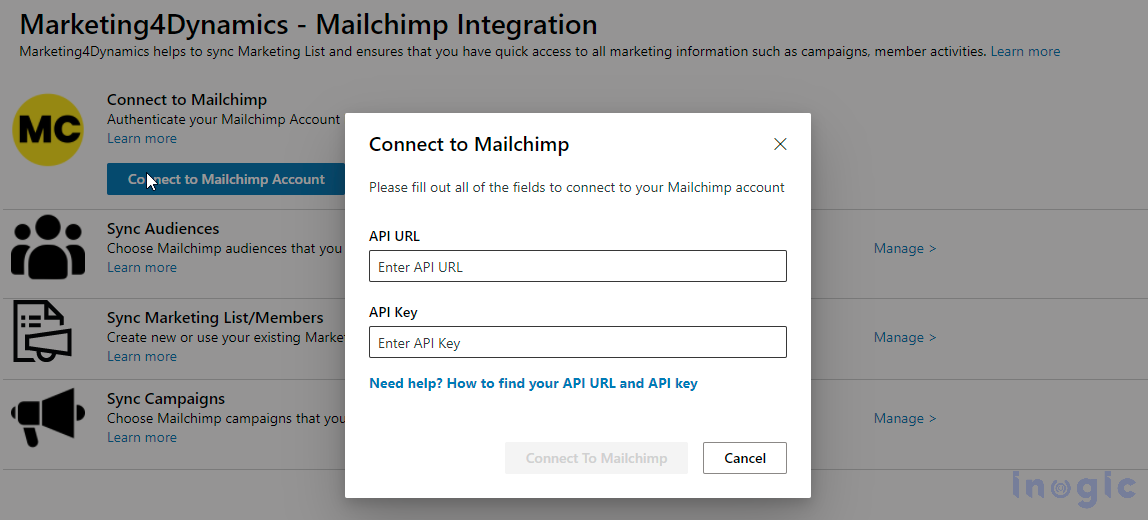
Step 1 — Connect CRM with Mailchimp
Authenticate CRM with Mailchimp using API credentials.
You’ll authorize CRM to access Mailchimp audiences and campaign data.
Step 2 — Map CRM Entities to Mailchimp Lists
Choose which CRM records should sync:
- Contacts
- Leads
- Marketing lists or segments
Map CRM fields (email, name, region, interests, etc.) with Mailchimp fields.

Step 3 — Set Sync Rules
Define behavior for:
- One-way or two-way sync
- Sync-ing new subscribers from Mailchimp back to CRM
- Handling unsubscribed or bounced records
- Regional filtering (e.g., only sync APAC/EMEA customers)
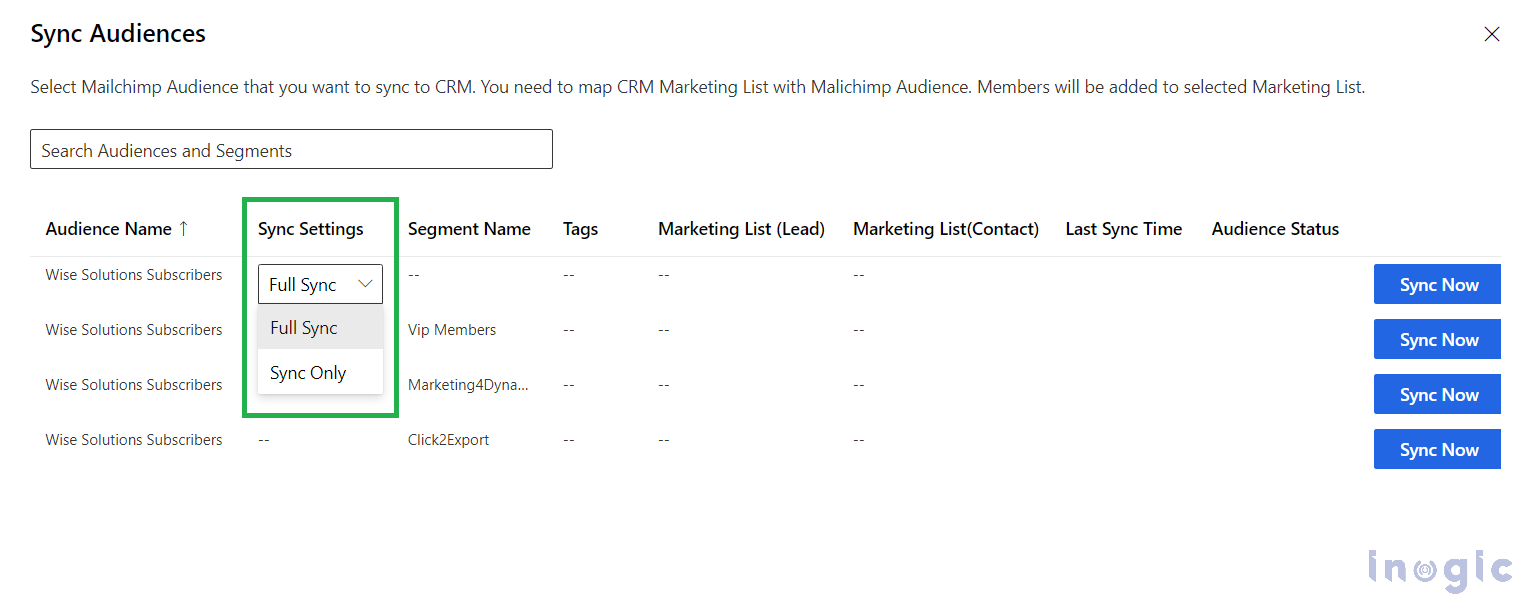
Step 4 — Start Initial Sync
CRM data pushes to Mailchimp.
From this point forward, scheduled or real-time sync ensures both systems stay aligned.
Step 5 — Optional Automations
You can configure workflows where:
- Mailchimp opens/clicks trigger CRM tasks
- Unsubscribes update CRM consent fields
- Campaign engagement influences lead scoring
Q5. What CRM entities can I sync with Mailchimp?
| CRM Entity | Mailchimp Equivalent | Description |
| Contacts | Audience Members | Direct sync for email campaigns |
| Leads | Audience Members | Can be nurtured via targeted campaigns |
| Marketing Lists | Audiences / Segments | Perfect for regional or industry-based targeting |
| Custom Fields | Merge Fields | For personalization and segmentation |
| Consent / Subscription Flags | Tags or Interests | Helps manage compliance & audience preferences |
Q6. What data flows back from Mailchimp into CRM?
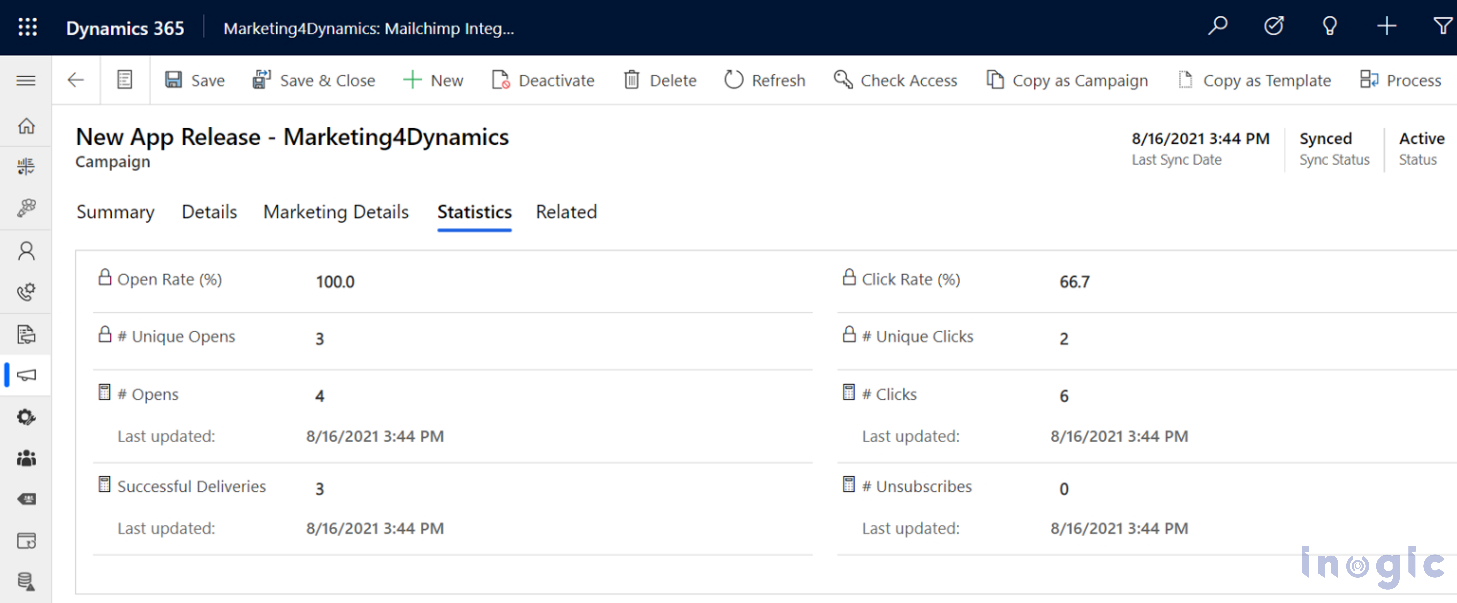
The integration sends campaign engagement metrics directly into CRM, such as:
- Email opens
- Clicks on links
- Bounces (hard/soft)
- Unsubscribes
- Campaign metadata (send time, subject, audience used)
This lets your sales team know who is interested, who is active, and who should be followed up with immediately.
Q7. What are the must-have features of a Dynamics 365 CRM + Mailchimp integration?
- Bi-Directional Sync: CRM and Mailchimp stay aligned at all times, reducing errors and data mismatches.
- Unified Customer View: Mailchimp engagement history appears on CRM records, helping sales evaluate lead interest.
- Advanced Segmentation: You can merge CRM attributes (industry, region, lifecycle stage) with Mailchimp segmentation tools (tags, interests).
- Automated Marketing Workflows: Behavior-based triggers such as:
- Customer opened campaign → trigger CRM follow-up
- Subscriber clicked pricing page link → increase lead score
- Unsubscribe event → update Do Not Email field
- Real-Time Campaign Tracking in CRM: You can view:
- Which contacts opened emails
- Who clicked specific links
- Most responsive segments
- Campaign performance over time
- Compliance & Subscription Management: Unsubscribes and suppressed contacts update CRM automatically.
- Zero Manual Excel Work: No more imports, exports, or file management — everything syncs consistently.
Q8. How often does the audience/data sync run when Dynamics 365 CRM and Mailchimp are integrated?
Depending on your connector, sync may be:
- Real-time
- Scheduled (every 5/10/30 minutes)
- On-demand (manual trigger)
Choose based on your operational needs.
Q9. Can I filter which CRM records sync to Mailchimp?
Yes. Common filters include:
- Country/Region (e.g., only UK + EU data)
- Lead status
- Contact owner
- Subscription preference
- Industry
- Custom criteria
This ensures only qualified, compliant, or high-value segments are pushed to Mailchimp.
Q10: How do I configure or stop the sync of Mailchimp Customer Journey emails in CRM?
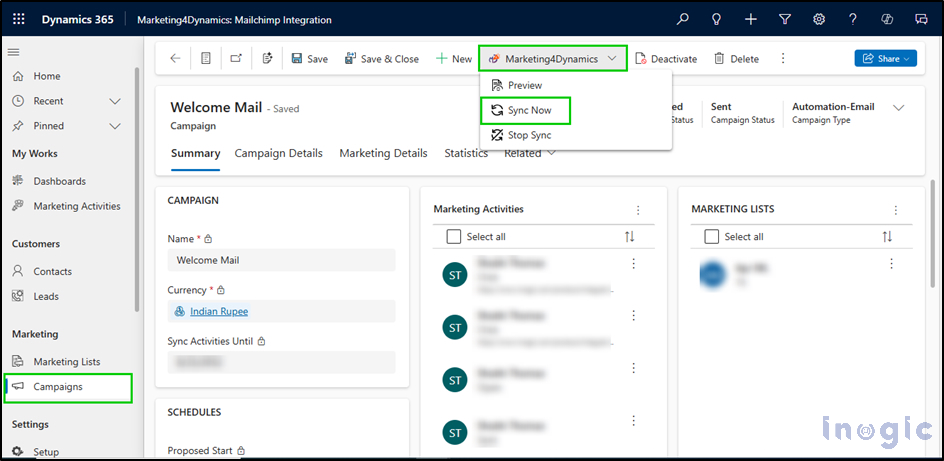
To enable syncing, go inside Marketing4Dynamics → Setup → Manage Sync Campaigns. There you’ll see both regular and automated (Customer Journey) campaigns. For automation campaigns, the “Campaign Type” is set to Automation-Email by default.
If you want to stop syncing a particular campaign (or multiple campaigns), open the campaign record(s) in CRM, then use the “Stop Sync” option from the Marketing4Dynamics ribbon. This will pause the sync (Sync Status becomes “Paused”). You can later resume it by clicking “Sync Now.”
Q11. How does Mailchimp integration manage duplicate CRM records?
A: When you use Marketing4Dynamics to sync between Mailchimp and Dynamics 365 CRM, the integration handles duplicates by combining several mechanisms under the hood:
- It primarily uses email-based matching (or a unique contact identifier) to detect if a contact from Mailchimp already exists in CRM — if the email (or unique ID) matches, it treats it as the same contact rather than creating a new one.
- It respects and leverages CRM’s duplicate-detection rules (or matching rules) that may already be defined in Dynamics — so if there are rules for matching on email, name, or other fields, those are used to avoid creating redundant Leads/Contacts.
- It applies conflict-resolution logic, meaning that when duplicates are detected (for instance across different CRM entities like Lead vs Contact), it avoids creating duplicate records in the wrong entity — it checks existing records across entities and chooses appropriately, preventing duplicate entries.
Together, these mechanisms help ensure that your CRM and Mailchimp audiences stay clean, preventing duplicate contacts and maintaining consistency across both systems.
Q12. Can email campaign performance be used for lead scoring and CRM predictions?
Absolutely. Engagement signals such as open/click activity can increase a lead’s score automatically, enabling:
- Smart prioritization
- Automated nurturing
- Sales alerts
Q13. Do unsubscribes in Mailchimp also update CRM?
Yes.
The integration updates CRM’s:
- Do Not Email flag
- Subscription status
- Marketing list membership
This keeps your data GDPR/CCPA compliant.
Best Practices for High-ROI Integration of Mailchimp + Dynamics 365 CRM
- Sync only relevant contacts: Avoid syncing outdated or irrelevant records.
- Keep field mappings clean: Accurate mapping ensures successful personalization.
- Use dynamic CRM segments for targeted campaigns: Regions like US, UK, EU, Australia, APAC can be separately synced.
- Train marketing + sales teams on unified insights: Both teams should regularly check CRM engagement history.
- Automate follow-up workflows: Turn email activity into CRM actions instantly.
Conclusion
Integrating Dynamics 365 CRM with Mailchimp is one of the most effective ways to connect marketing automation with customer management.
From cleaner data, smarter segmentation, and real-time engagement insights to automated workflows — this integration accelerates revenue operations across industries and geographies.
Whether you’re an SMB or enterprise in North America, Europe, UK, India, Australia, or APAC, this setup ensures your teams work cohesively and efficiently.
For more details, visit the Inogic Website or Microsoft Marketplace.
Reach us at crm@inogic.com to get a demo of Mailchimp – Dynamics 365 CRM integration.